A network license is locked to an individual server computer and permits the use of StructurePoint software by many computers on that network. Each user on the network will have access to StructurePoint software based on the users’ entitlement as purchased and agreed to by the client. License codes are uniquely issued to the client in support of their entitlement, detailing the user groups’ name, location, geography, and may include the level of entitlement for a single site, multiple sites, state, country, region, or the global enterprise as acquired by the client.
Network Licensing utilizes a Sentinel RMS v8.5.2 License Manager to manage license entitlements for the client users’ workstations over a network. The license manager should be installed on a reliable server computer residing in the same physical office location that it will be accessed from over a Local Area Network (LAN) and should be located on the same subnet.
As authorized by the license purchase agreement executed with StructurePoint, other Wide Area Network (WAN) host server configurations, such a Metro WAN, State WAN, Country WAN, and Global Enterprise servers are also feasible. Cloud-hosted solutions provided using StructurePoint servers are also provided based on the user agreement acquired by the client. Any other variant is considered a violation of the EULA and is none compliant.
The client users’ workstation acquires a license from the network license server when the software is launched, and remains in use until the software is closed. The number of available licenses, or seats, is encoded in the license code hosted on the server. License codes are unique to the designated license server.
To adjust or modify the license entitlement for your users group, please email the StructurePoint licensing team at Licensing@StructurePoint.org.
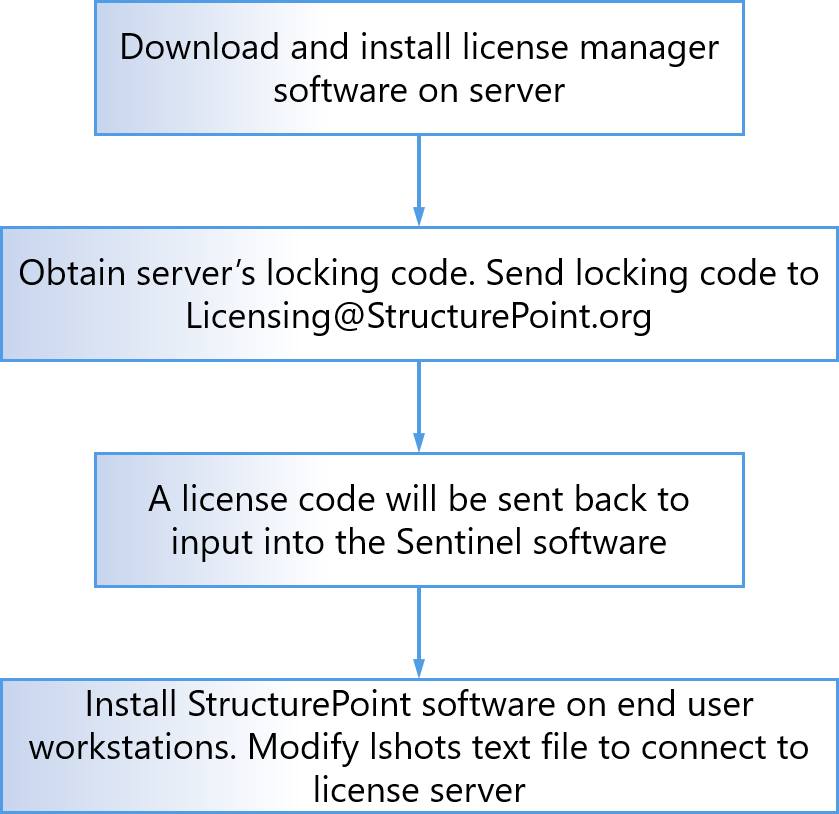
An overview of the key steps required for network license installation and deployment are illustrated below.