3.5Access Menu
Auto Input
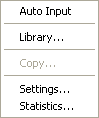 This command is designed to make the input process easier. By selecting Auto Input, a logical sequence of dialog boxes will automatically be displayed allowing you to enter data needed to model your structure.
Library
Creates new libraries or includes existing libraries in the current file for materials, sections, member loads, and non-prismatic members.
Copy
Sends a copy of the graphic image displayed on your window to the Clipboard.
Settings
Allows you to change the settings for the angle of separation used while viewing the structure in stereoscopic 3-D format.
Statistics
Provides information such as the structure type, number of joints, number of members, amount of memory used, and the amount of memory available.