3.32Define Fixities
All defined joints are assumed to be free to move or rotate in the direction related to their degrees of freedom. Fixed joints (supports) are defined using the Process/Fixities command.
•From the Process menu, select Fixities. The dialog box of Figure 3-20 appears. Some options may not be available depending on the structure type selected.
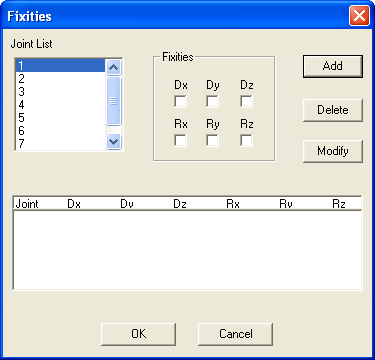
Figure 3-20 Fixities dialog box
•From the JOINT LIST list box, select the joint whose fixities you want to specify.
•In the FIXITIES options group, select the joint displacement or rotation to be fixed.
An  in a check box denotes that the displacement or rotation associated with that box is fixed. A clear box denotes that the displacement or rotation associated with that box is free.
•Choose the ADD button or press ENTER. The data entered are added to the list box at the bottom.
•Repeat the three steps above for each fixed joint entry you have.
•To edit an entry that has been added to the list box, select that entry from the list box, modify its values, and choose the MODIFY button.
•To remove an entry that has already been added to the list box, select that entry from the list box and choose the DELETE button.
•Choose the OK button.