3.38Define Shear Corrections
By default, shear deformations are not included in computing a member deformation. To include shear deformations for a member, use the Process/Shear Corrections command. This command is available for frame members only.
•From the Process menu, select Shear Corrections. The dialog box of Figure 3-27 appears.
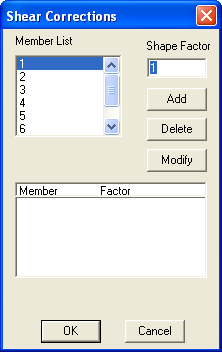
Figure 3-27 Shear Corrections dialog box
•From the MEMBER LIST list box, select the member to input a shape factor for.
•In the SHAPE FACTOR text box, enter the shape factor. The value entered must be between 0.1 and 10.
•Choose the ADD button. The data entered are added to the list box at the bottom.
•Repeat the three steps above for each shear correction entry you have.
•To edit an entry that has been added to the list box, select that entry from the list box, modify its value, and choose the MODIFY button.
•To remove an entry that has already been added to the list box, select that entry from the list box and choose the DELETE button.
•Choose the OK button.