4.5Define Section Properties
•From the Define menu, choose Sections.
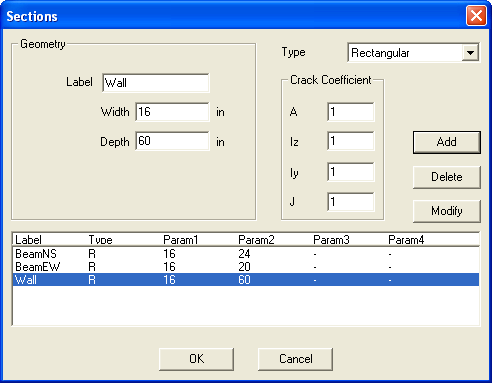
Figure 4-6 Define Section Properties
•Open the TYPE drop-down list and select RECTANGULAR.
•In the LABEL text box, enter BeamNS.
•In the WIDTH text box, enter 16.
•In the DEPTH text box, enter 24.
•Press ENTER or choose ADD.
•In the LABEL text box, enter BeamEW.
•In the WIDTH text box, enter 16.
•In the DEPTH text box, enter 20.
•Press ENTER or choose ADD.
•In the LABEL text box, enter Wall.
•In the WIDTH text box, enter 16.
•In the DEPTH text box, enter 60.
•Press ENTER or choose ADD.
•Choose OK.