5.24Assign Spring Supports
From the Assign menu, choose Springs. The modeless dialog box of Figure 5-17 appears. Some options may not be available, depending on the structure type selected. This box has two modes, ASSIGN and SHOW. To end spring support assignment, choose the CLOSE button.
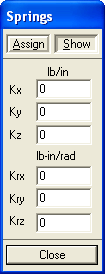
Figure 5-17 Springs dialog box
In the available text boxes, enter the translational and rotational spring constants for the active degrees of freedom. This becomes the active assignment.
•Choose the ASSIGN button. All joints that share the active assignment are shown in red in the Graphics area. Joints with different assignments are shown in black and joints with no assignment are shown in green.
•In the Graphics area, using the left-mouse button, click on a single joint or marquee select a group of joints. To remove the assignment, do the same using the right-mouse button.
•Choose the SHOW button.
•In the Graphics area, click on a joint. All joints that have the same assignment as the selected joint are shown in red and the assignment is displayed in the SPRINGS box.