5.29Rigid Diaphragms Assignment
•From the Assign menu, choose Rigid Diaphragms. The modeless dialog box of Figure 5-22 appears. To end rigid diaphragm assignment, choose the CLOSE button.
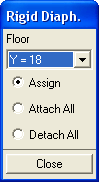
Figure 5-22 Rigid Diaphragm dialog box
•Choose the ATTACH ALL option button to attach all beams on all floors to rigid diaphragms.
•Choose the DETACH ALL option button to detach all beams on all floors from the rigid diaphragms.
5.29.1To Attach or Detach Individual Members
•From the FLOOR drop-down list, select the level to work with.
•Choose the ASSIGN option button. Only the beams on the selected level will be affected by the assignment.
•In the Graphics area, using the left-mouse button, marquee select the member or members to attach to the diaphragm. To detach members from the diaphragm, do the same using the right-mouse button.