3.6. MTX Editor
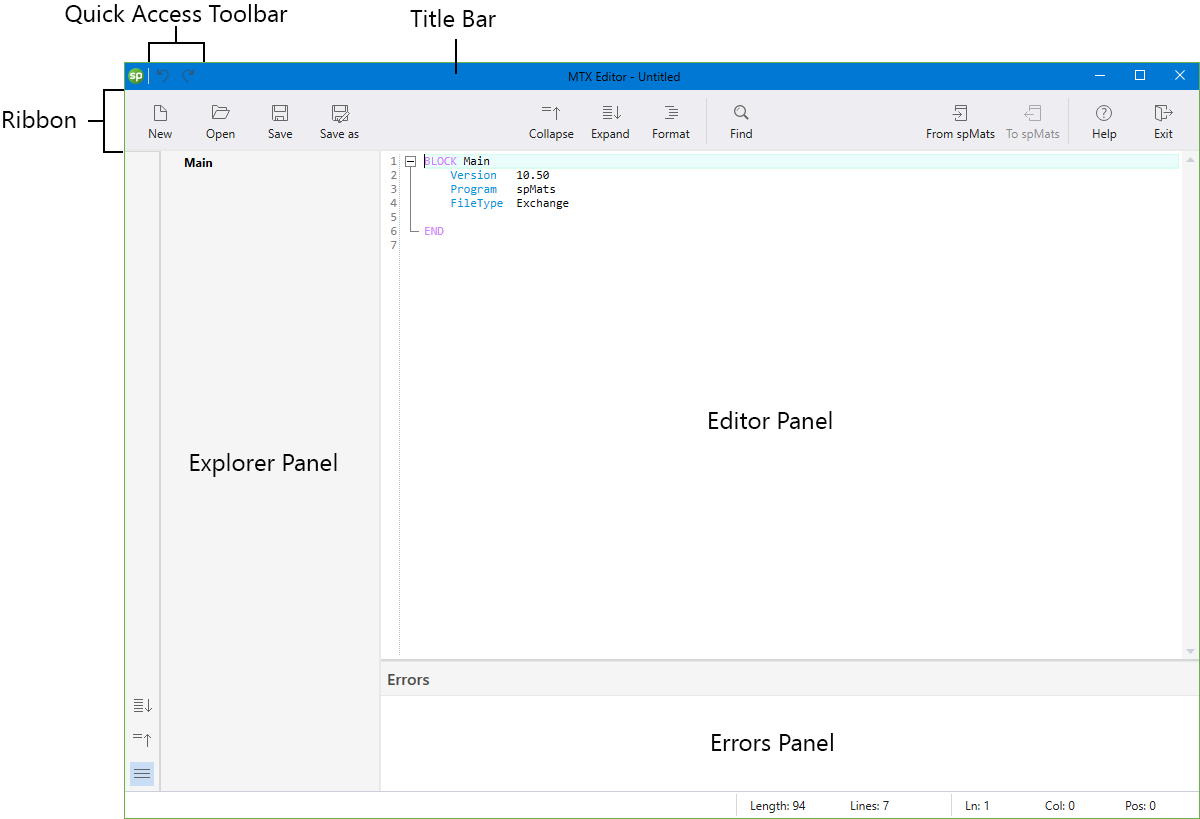
The Main MTX Editor shown above consists of the following:
The Quick Access Toolbar includes the Undo and Redo commands.
The Title Bar displays the editor's name, along with the filename of the current data file in use. If the file is new and has not yet been saved, the word “Untitled” is displayed in the Title Bar. It also displays “(Modified)” if the file has been changed and not saved yet.
The Ribbon gives quick access to the editor commands.
The Explorer Panel lists all the available Blocks and their Tables arranged hierarchically. Any item in the Explorer Panel can be clicked on to navigate to it in the Editor Panel.
The Editor Panel lists the contents of the MTX file. Different parameters like blocks, keys, values and comments are color coded to facilitate quick and efficient working with the format. User can make changes to the MTX file in the Editor Panel.
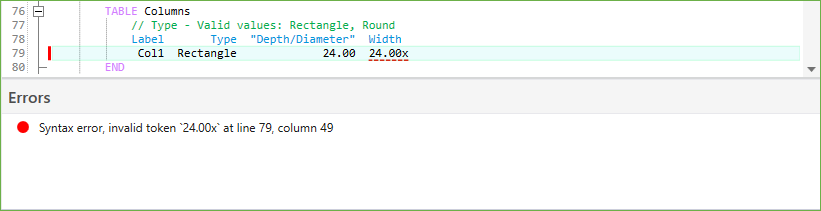
The MTX editor uses spMats' internal error handling mechanism to identify and show errors in MTX files. Errors if any, in the MTX file are highlighted in the Editor Panel with the description listed in the Errors Panel.