3.26Define Materials
Material properties are first defined using the Define/Materials command and then assigned to the different members using the Process/Member Types command.
•From the Define menu, select Materials. The dialog box of Figure 3-13 appears.
•Enter a material label in the LABEL text box.
•Enter the material density (d), modulus of elasticity (E), Poisson’s ratio (v), and thermal coefficient (a), in the corresponding text boxes.
•Choose the ADD button or press ENTER. The data entered are added to the list box at the bottom.
•Repeat the three steps above for each material entry you have, making sure that no duplicate labels are entered.
•To edit an entry that has been added to the list box, select that entry from the list box, modify its values in the text boxes, and choose the MODIFY button.
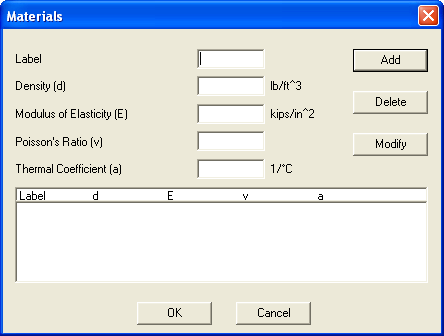
Figure 3-13 Materials dialog box
•To remove an entry that has already been added to the list box, select that entry from the list box and choose the DELETE button.
•Choose the OK button.