3.2spFrame Window
Most windows have certain components in common, such as a title bar and menus. Not all windows, however, have every component. To learn more about how to use window components, refer to your Microsoft Windows manual. The following is a list of the spFrame window components.
Control-menu box
Control-menu box is located in the upper-left corner of a window and includes commands for sizing, moving, enlarging, restoring, and closing the window, as well as switching to other applications. To access the Control-menu box using the mouse, click the left-mouse button on the box. To access the Control-menu box using the keyboard, press ALT + - (hyphen).
Minimize/Maximize buttons
These buttons are located in the upper-right hand corner of a window. Minimize button (represented by a flat line) shrinks the spFrame window to an icon. Maximize button (represented by a square) enlarges the window so that it fills the entire desktop.
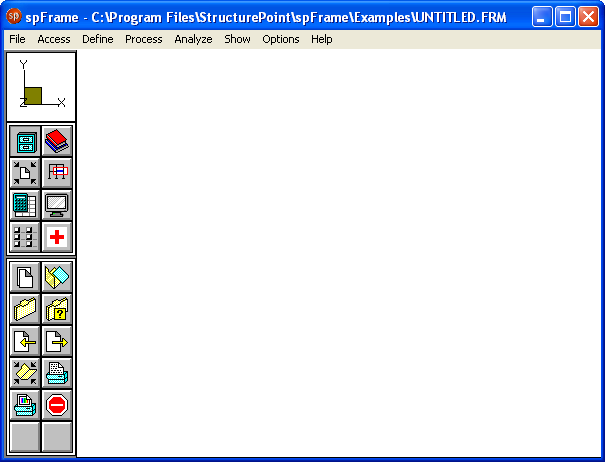
Figure 3-1 spFrame Window
Title Bar
Title bar displays the name of the application or document (spFrame in thiscase) along with the name of the current data file you are using. If the data you are working on have not been saved into a file, the word “Untitled” is displayed in the Title bar.
Menu Bar
Menu bar is located directly below the Title bar and lists the available menus. A menu contains a list of commands and options you may execute using the program. In spFrame there are eight main pull-down menus. Menus include File, Access, Define, Process, Analyze, Show, Options, and Help.
Tool bar
Tool bar is located on the left side of the spFrame window and contains a collection of icons (or buttons) that provide you with a shortcut to accessing the various commands and options. Tool bar consists of three major sections. The top section shows the global axis orientation of the structure, the middle section contains eight icons that represent the pull-down menus, and the bottom section contains up to twelve icons that represent the commands or options available.
Graphics area
Graphics area covers most of the spFrame window. This is where the graphical model of the structure will be displayed.