The key to successfully implementing spWall in a project is to understand the unique and powerful approach the program takes in modeling, analyzing, designing, and investigating a structural member subjected to in-plane and/or out-of-plane axial and/or flexural loads. This chapter provides an overview of assumptions and considerations the design professional must take into account while utilizing spWall.
As a general rule, the geometry of the analytical model shall correspond to that of the physical member as closely as possible.
The user shall ensure the project criteria aligns correctly with applicable design code and standard provisions on subjects such as load type, load factors, load combinations, material properties, design criteria, and cracking coefficient to name a few.
4.1.1. Physical Modeling Terminology
In spWall, reference is often made to objects, members, and elements. Objects represent the physical structural members in the model. Elements, on the other hand, refer to the finite elements used internally by spWall to generate the stiffness matrices. In many cases, objects and physical members will have a one-to-one correspondence, and it is these objects that the user draws in the spWall interface. Objects are intended to be an accurate representation of the physical members. Users typically need not concern themselves with the meshing of these objects into the elements required for the mathematical, or analysis finite element model. For example, a single area object can model an entire plate, regardless of the number of spans and variety of loads. With spWall, both model creation, as well as the reporting of results, is achieved at the object level.
This differs from a traditional approach in previous versions of the program, where the user is required to define a sub-assemblage of finite elements that comprise the larger physical members. In spWall, the objects, or physical members drawn by the user, are automatically meshed internally prior to the analysis, into the greater number of finite elements needed for the analysis model, without user input. Because the user is working only with the physical member-based objects, less time is required both to create the model and interpret the results. The user, however, can dictate several meshing criteria after examination of the automatic mesh proposed by the program.
It is extremely important that you grasp the concept of objects in a structural model as it is the basis for creating models in spWall. After you understand the concept and have worked with it for a while, you should recognize the simplicity of physical object-based modeling, the ease with which you can create models using objects, and the power of the concept when editing and creating complex models.
The spWall program uses objects to represent physical structural members. When creating a model, start by drawing the geometry using drawing area common Computer-Aided Design (CAD) tools and then assign properties and loads to completely define the structure.
The following object types are available, listed in descending order of geometrical dimension:
• Plate/Area objects are used to model plates, openings, and area loads
• Stiffener objects are used to model stiffeners, null stiffeners, linear restraints, and line loads
• Node objects are automatically created at the corners or ends of all other types of objects and also can be added manually anywhere in the model. Node objects are used to model point loads as well as for applying point restraints and springs.
As a general rule, the geometry of the object should correspond to that of the physical member as much as possible. This simplifies the visualization of the model and reduces the chances of input error. However, engineers can omit small changes in shape and geometry where added model accuracy or complexity is not consequential to the analysis & design results. A great deal of engineering judgment is involved in the conversion of a physical structure into an analytical model. However, significant gains can be achieved by keeping model simple & practical to the extent possible.
Properties are assigned to each object to define the structural behavior of that Plate/Area and/or Stiffener object in the model. Properties under the Definitions window, namely concrete, reinforcement, plate cracking coefficient, plate design criteria, stiffener cracking coefficient, and stiffener design criteria properties, are named entities that must be specified before assigning them to objects. If a property is assigned to an object, for example a plate design criteria property, any changes to the definition of the property will automatically apply to the plate objects with this property assigned. A named property has no effect on the model unless it is assigned to an object.
The first step in preparing the input is to draw a scaled elevation view of the wall. The elevation view should include the boundaries of the plate and/or stiffeners, variations in the plate thickness and material properties, and openings within the plate. All superimposed loads applied on the plate and/or stiffeners should also be added. Structural grids and drawing area tools should be used to speed input preparation.
The next step is to select suitable mesh criteria including the maximum allowed mesh size, the maximum allowed aspect ratio, and the number of segments the circumference of a circular plate (if any) is to be divided in. Based on these parameters, plate and stiffeners boundaries, and point loads, the program automatically creates the most suitable mesh to use for the FEM analysis.
The user can increase or decrease the mesh density by changing the maximum allowed mesh size. A well-graded mesh will produce results which will effectively capture the variations of the displacements and element forces. While the use of finer meshes will generally produce more accurate results, it will also require more solution time, computer memory, and disk space. Elements with aspect ratios (length/width) near unity are generally expected to produce accurate results for regions having gradual changes of curvature. For plate regions where heavy concentrated forces are applied and where drastic changes in geometry exist, the use of finer element meshes may be required. Thus, in order to obtain a practical as well as accurate analytical solution, engineering judgment must be used.
The member nodal incidences are internally computed by the program. All nodes and members are numbered from left to right (in the positive X-direction) and from bottom to top (in the positive Y-direction), as shown in "Figure 4.1 - Node and Element Numbering in Analytical Model". When the reference grid system and/or assembling of elements is modified, the program internally renumbers all nodes and elements. In order to save solution time, memory, and disk space, it is recommended to position the side of the plate with fewer nodes (i.e., fewer degrees of freedom) parallel to the X-direction.
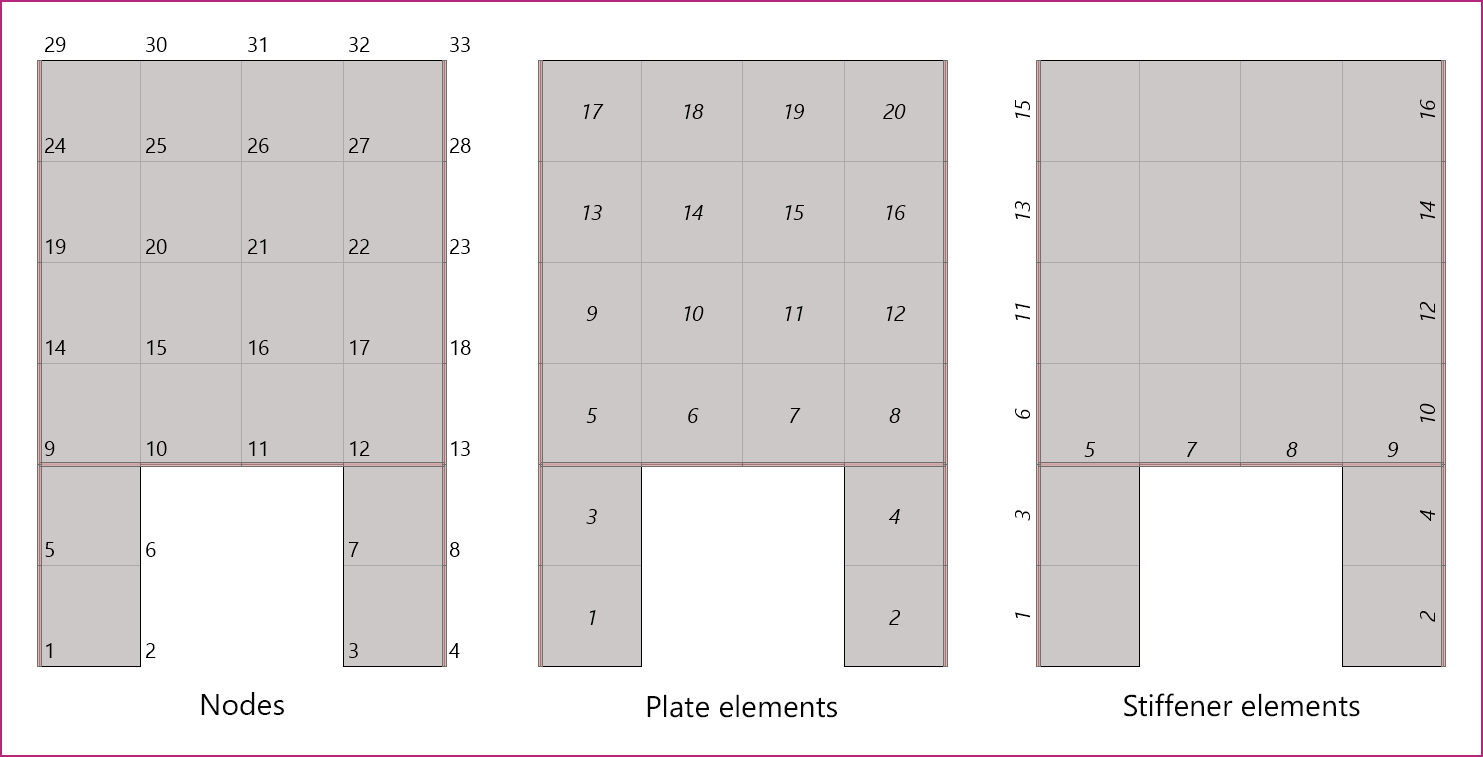
Figure 4.1 - Node and Element Numbering in Analytical Model
4.1.5. Modeling Considerations
As a multipurpose analysis program, spWall is used in many structural and architectural systems (Section 2.1.1) that warrant special consideration when constructing the analytical model. The engineer has to consider the unique aspects of a wall system type, usage, loading application and several other factors. Commonly, additional consideration is given to temporary loading conditions arising from lifting, shipping, erecting, shoring, or bracing for a wall or panel. The presence of temporary or permanent joints, reductions in wall cross-section, architectural reveals, anchored plate, and weldments is also important to consider in the construction of a successful wall model. In liquid-containing concrete tanks, manholes, swimming pools and other underground wall systems, the counteracting effects of active fluid and passive soil pressures can be a key consideration in the model. The sections below highlight a few of many important considerations for spWall users to be aware of.
4.1.5.1. Dock Door Restraints at Floor Slab
In warehouse and big box construction, reinforced concrete wall panels are used in what is commonly referred to as the “Rigid Wall Flexible Diaphragm” (RWFD) structural system. In RWFD construction, the wall panel is supported on grade beams or other foundation systems at a distance below the floor slab elevation. When the floor slab at grade is cast after wall erection it is dowelled into the concrete wall and provides another diaphragm support several feet above the vertical support at the foundation elevation. The wall panel becomes a two-span beam with hinged support at the base and two lateral restraints at the roof and slab on grade diaphragms. This condition changes the traditional behavior of the wall generally simplified into a single span simply supported between the roof and the foundation. The fixity generated by the restraining force couple at the wall base along with any parapet cantilevering above the roof level generates negative moments that must be evaluated and designed for by the engineer. In many cases, this alters the wall behavior sufficiently to exclude such wall panels from the limitations imposed by simplified analysis methods provided for simple span wall panels and complicates the computation of the second-order effects.
4.1.5.2. Wind Loads on Doors and Windows Openings
Wall panels that contain openings for windows, doors, dock doors, and other penetration for MEP equipment and appurtenances are very common in precast and tilt-up construction. Lateral forces from wind and seismic forces are normally applied as an area load to the entire wall. However, at opening locations, the engineer has to determine the magnitude and location of the concentrated and line load to replace the equivalent lateral force applied to the opening area covered by door or window system. A clear understanding of how the opening is covered and the attachment mechanism will dictate the loads to be applied to the wall analytical model to properly account for both gravity and lateral loads at opening locations.
4.1.5.3. Roof Joist Load Applications
Reinforced concrete wall panels are commonly used to carry gravity loads to the foundations. Roof systems made with open web steel joists, trusses, and single and double tee precast girders deliver their reactions to the wall panel as concentrated loads at a set recurring spacing along the roof line. Similarly, intermediate floor systems with steel or concrete beams deliver similar concentrated point load to the wall at various elevations. The concentrated loads are frequently replaced with an equivalent uniform line load normally deemed to satisfy the analysis and design intent of the panel. It is important to verify this modeling assumption where it is used for applicability based on the size and shape of the wall panels. The presence of loads near and edge of an opening may influence the ability of the point load to distribute uniformly and in such cases using the exact point load magnitude and location may be advisable.
4.1.5.4. Modeling of Roof Diaphragm Restraints
Horizontal diaphragms at the roof, floor, and other locations along the height of a reinforced concrete wall is used to provide lateral stability for the wall. Modeling such restraint is commonly intended to restrain out-of-plane deflection and provide stability in the minor axis of the wall. Where restraint in-plane is combined with out-of-plane is required, special care should be taken to ensure the restraint and the corresponding reactions are accounted for in the reinforcement design and detailing of the wall.